WebSSH was not supposed to become a large project.
The original requirement was almost boring: I wanted a terminal I could open in a browser, point at one of my servers, and use without installing an SSH client on the device in front of me. There were already browser terminals around, but most of them stopped at the terminal. I still needed another tool for files, a notes window for the command I was about to forget, and several tabs when more than one server was involved.
That was enough reason to start building.
The project kept growing because every time I used it for real work, the next missing piece became obvious. A second session needed tabs. Tabs needed split panes. Repeated connections needed saved profiles. Bastion hosts needed proper ProxyJump support. File work needed more than an upload button. Once other users entered the picture, authentication, ownership, audit trails, quotas, recovery, and backups stopped being optional details.
Today, WebSSH is the open-source project that best represents how I like to build security tools: useful enough for daily work, self-hosted, explicit about trust, and honest about what it cannot safely do.
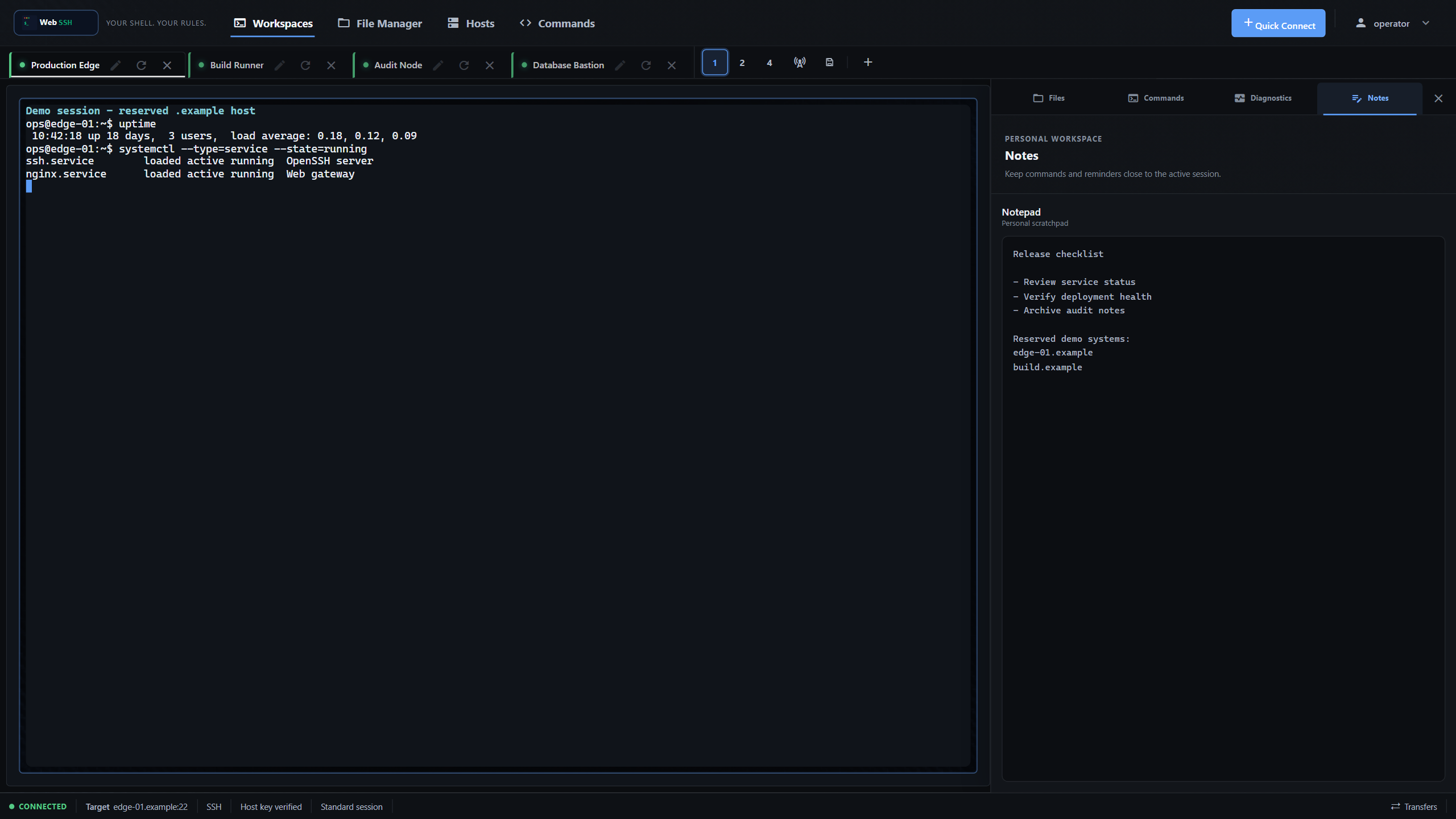
A workspace, not just a terminal
The terminal is still the centre of WebSSH, but it is no longer the whole product. Sessions live in tabs and can be arranged in one-, two-, or four-pane layouts. Broadcast mode can send the same input to several open terminals, which is useful and intentionally hard to overlook. The default quota allows five concurrent SSH sessions per account and ten across the instance; operators can tune those limits as part of the wider capacity model. Persistent tmux sessions can keep a remote shell alive when the browser closes, provided tmux is available on the target.
The single-session view is the part I use most. It keeps the active terminal next to four session-aware contexts: Files, Commands, Diagnostics, and Notes. The context follows the selected session, and WebSSH probes what the target actually supports instead of assuming that every machine is Linux or exposes SFTP. I do not have to remember which file pane belongs to which shell or which host a note was about.
That sounds like a user-interface detail. Operationally, it matters. Mixing up two production hosts is a far more realistic failure mode than most exotic attacks people like to discuss. Clear host labels, explicit connection state, visible SSH trust, and session-scoped tools reduce that risk.
Saved connections handle hosts, usernames, authentication choices, jump hosts, tmux preferences, and post-connect behavior. They can be grouped, reordered, searched, and marked as favorites without opening an SSH connection. Credentials are deliberately not stored in profiles. Password-dependent connections return to the connection form when they need a password; key and Tailscale connections can reconnect directly when their policy allows it.
SFTP had to become a first-class tool
The early file manager worked, but it felt bolted on. Real server work quickly exposed the difference between “can upload a file” and a useful file workspace.
WebSSH now has a source-first SFTP interface with independent tabs and one- or two-pane layouts. It supports uploads, downloads, previews, inline text editing, folder downloads, conflict handling, and a shared transfer queue. Two connected servers can transfer files directly through WebSSH without routing them through the browser first.
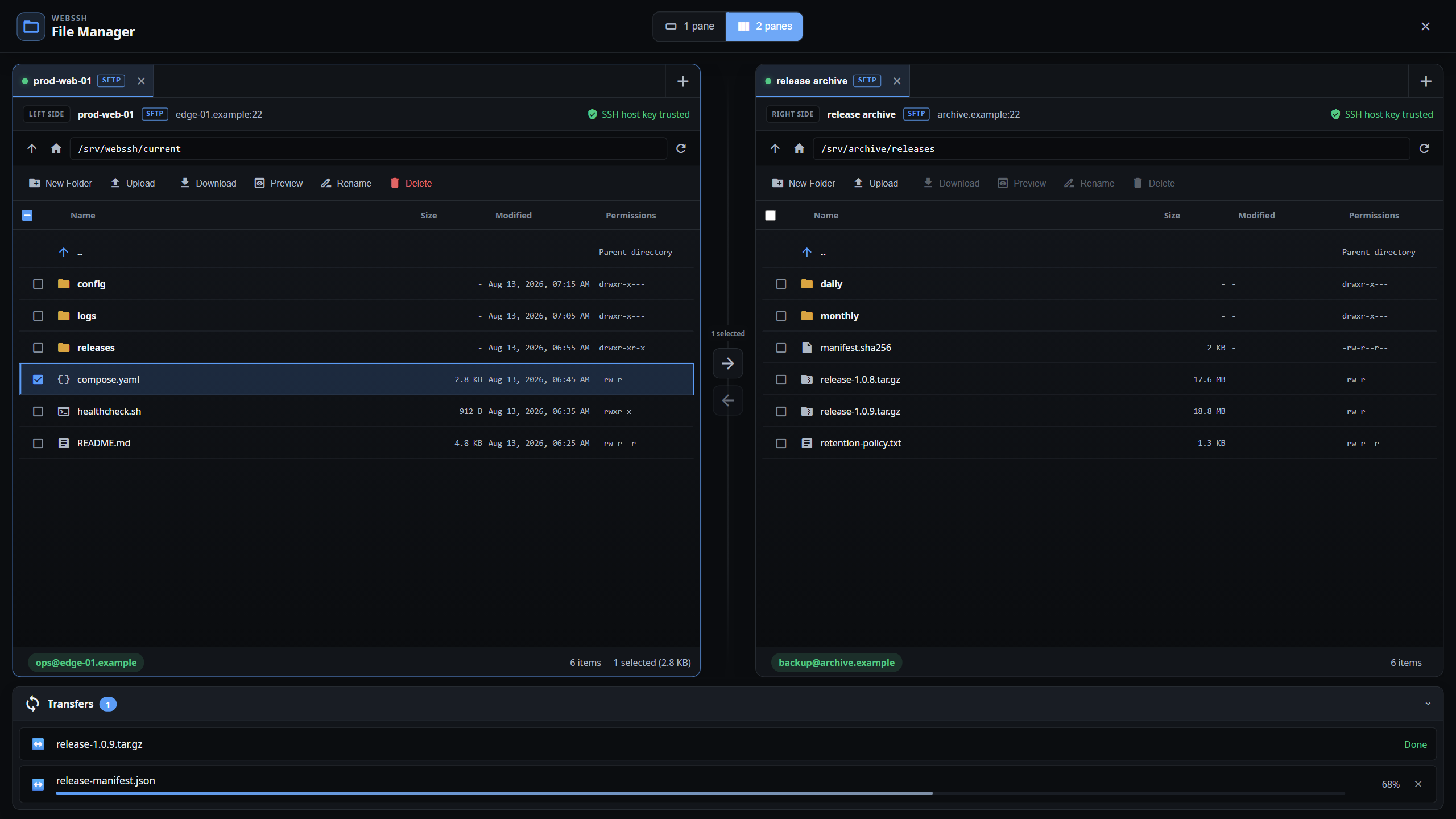
Each pane shows its source, endpoint, path, and host-trust state. Transfers have progress and cancellation instead of disappearing into a spinner. Size limits, quotas, path validation, and per-user ownership checks apply on the server side; hiding a button in the browser is never treated as an authorization boundary.
There is one feature visible in the interface that is intentionally not active: SMB. It remains marked Coming soon. Adding another storage protocol is not a matter of swapping an SFTP label for an SMB label. It needs its own authentication model, network policy, ownership rules, quotas, and failure handling. Until that design is complete, WebSSH does not start an SMB connection in the background and I do not describe it as a supported backend.
Commands should stay visible before they run
Repeated terminal work eventually produced two related tools. The Command Library stores named commands with an optional Linux, macOS, BSD, or Windows scope. Command Sets combine library entries and free-text steps into an ordered sequence. A set can be duplicated, assigned to a saved profile, or selected when opening a connection.
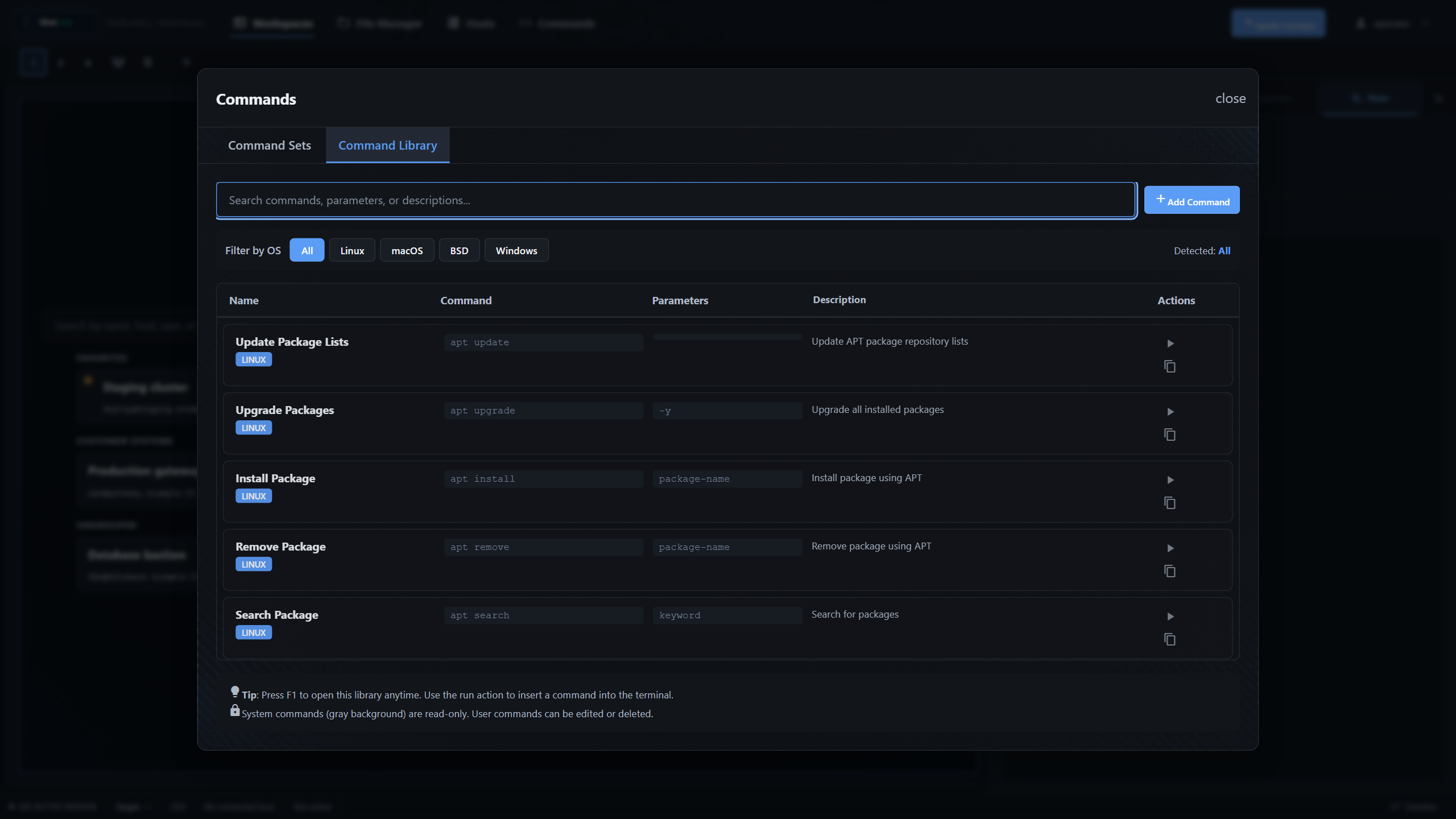
The connection dialog shows the resolved post-connect text before SSH starts. New command sets can opt into sudo, but WebSSH does not store or answer the password prompt. Inside a live session, choosing a command inserts one visible line into the active terminal and deliberately does not press Enter. I still get the speed of a library without hiding the moment where a command becomes an action.
That boundary is more useful to me than trying to make the browser look clever. Commands can be reused, parameterized, and kept close to a host, but the operator can still see what is about to happen.
Security work changed the shape of the project
Once a browser application accepts SSH credentials and opens connections on behalf of users, it becomes trusted infrastructure. There is no clever wording that removes that fact.
TLS protects traffic between the browser and WebSSH when it is deployed behind HTTPS. SSH protects the connection from WebSSH to the target. The WebSSH process still handles credentials during connection setup, terminal input and output, and file data while the session is active. It is not an end-to-end encrypted relay that is blind to what passes through it.
That boundary shaped most of the security work:
- Stored private keys are encrypted per user rather than kept as readable files.
- SSH host keys are persisted and changes require an explicit trust decision.
- Socket.IO events, SSH sessions, temporary SFTP connections, and file operations are checked against their owning account.
- Local accounts can use passkeys, TOTP authenticator apps, and recovery codes.
- OIDC and LDAP/Active Directory are optional identity sources. They do not bypass WebSSH’s local account and authorization model.
- Authentication, SSH, and file activity is written to structured audit logs with bounded retention and export.
- Backup and restore operations use maintenance mode, staging, validation, quotas, and explicit confirmation.
- Browser dependencies are vendored with the application. The interface does not rely on a runtime CDN and WebSSH contains no built-in telemetry.
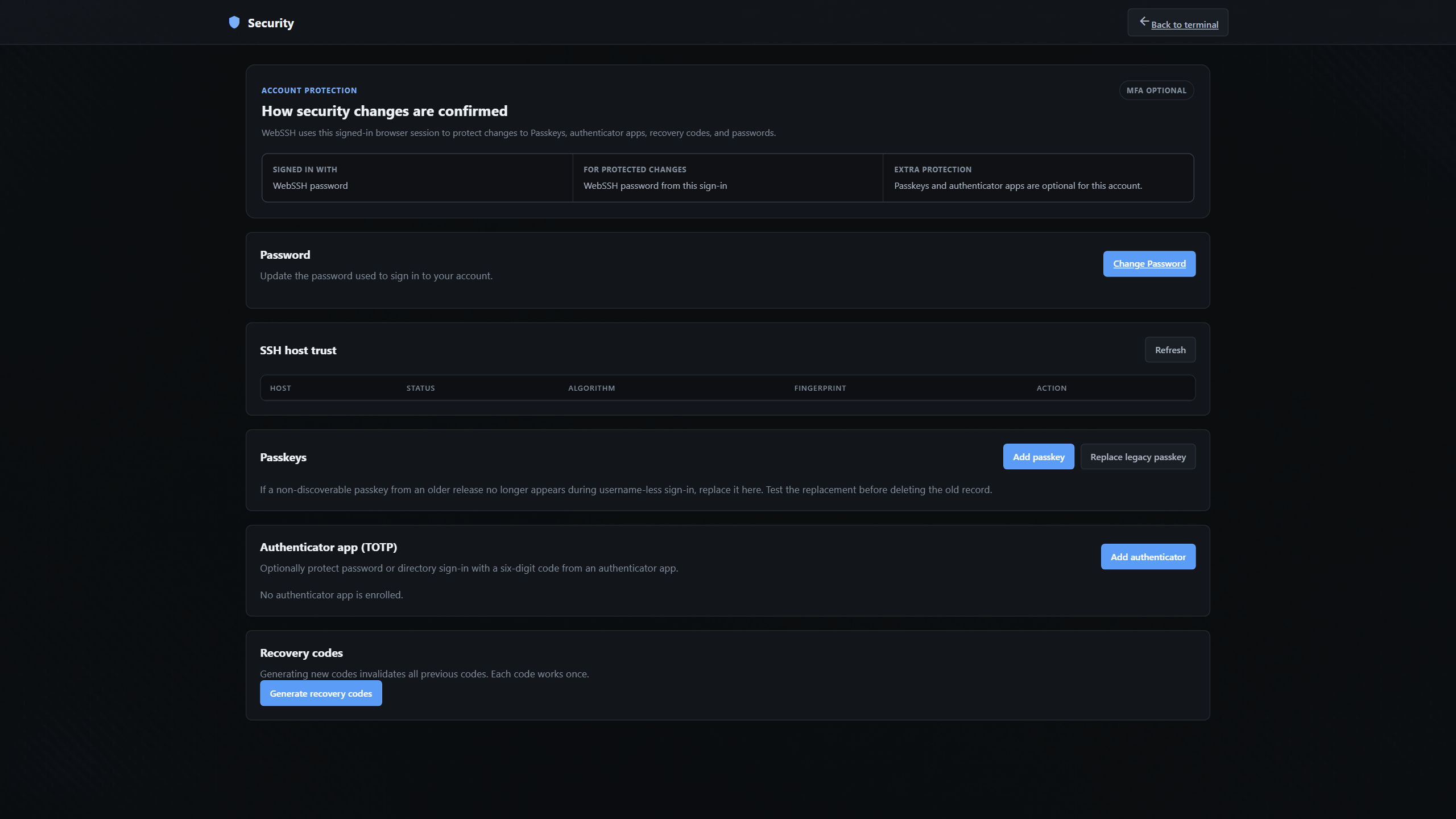
The Security Center brings account protection and SSH trust into the same view. It explains which sign-in method will confirm a protected change instead of simply asking for an unexplained extra prompt. Passkeys and authenticator apps remain optional factors, recovery codes are one-time use, and known-host decisions stay owned by the individual WebSSH account.
I also keep a local break-glass administrator even when external identity is enabled. An identity provider outage should not turn into losing administrative access to the gateway needed to repair the environment.
Some decisions are deliberately conservative. Production uses exactly one Gunicorn gthread worker because live SSH state and part of the quota model are process-local. Running several workers would look like scaling, but it would split state and create failure modes the application does not currently solve. Horizontal scaling requires a different session-state architecture, not another replica in a Compose file.
Useful diagnostics without pretending to be a monitoring platform
WebSSH can show live CPU, memory, disk, normalized load, uptime, process, network, systemd, and Docker information for a supported Linux session. History and pressure charts make the current values less misleading than a single snapshot. The diagnostics view grew from a much smaller status panel because I wanted enough context to answer the first operational question: is the server healthy enough for the work I am about to do?
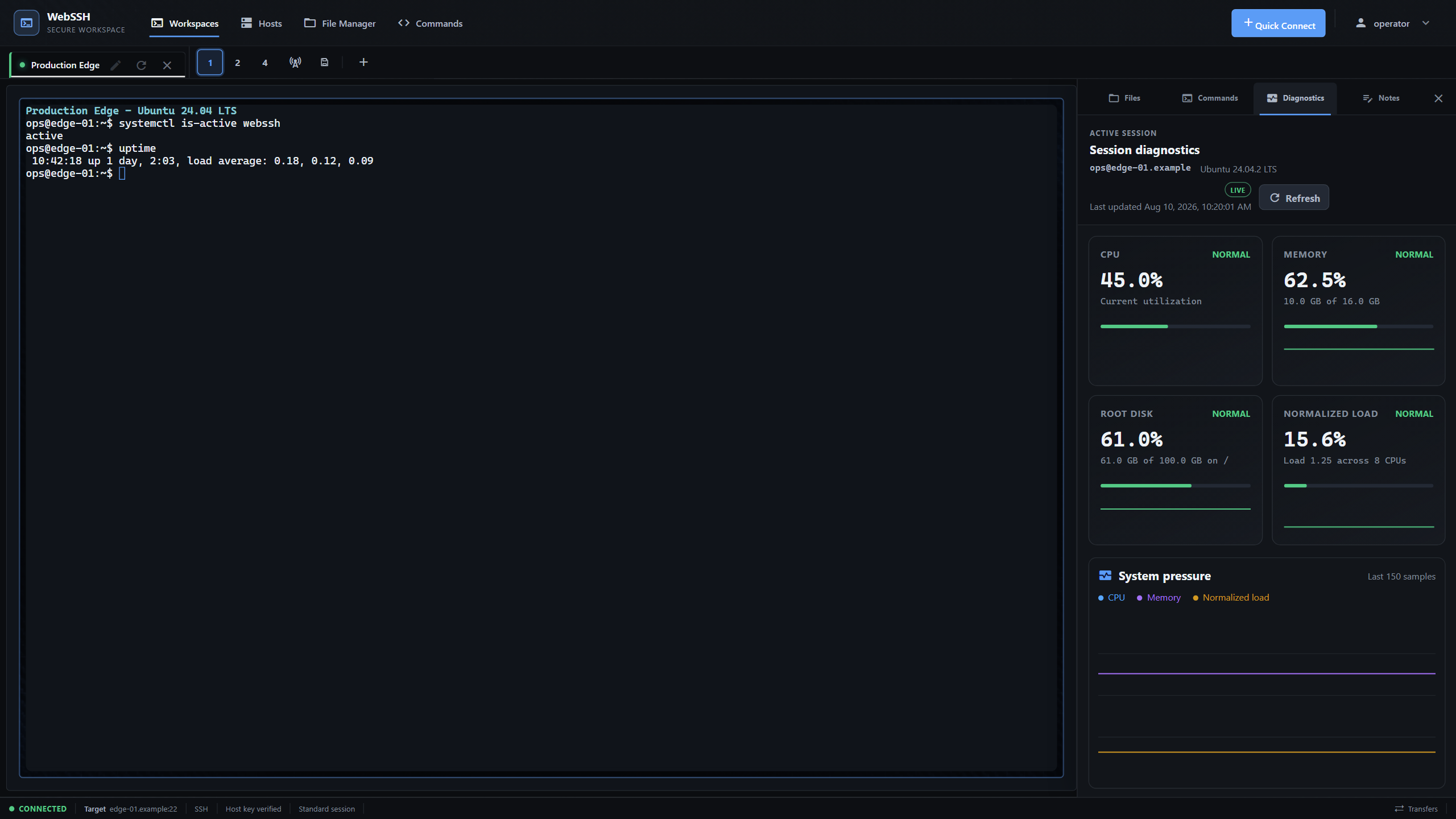
It is not a replacement for Prometheus, Grafana, or a proper observability stack. The data is session context, not long-term monitoring. Service actions follow the same restraint: WebSSH prepares an allow-listed systemctl command and copies it to the clipboard with a visible confirmation. It does not execute the service change itself. The operator still sees and runs the command in the terminal.
That distinction is important to me. Convenience should reduce repetitive work, not quietly turn a browser panel into an automation system with more privilege than the person using it understands.
Deployment is intentionally ordinary
The current quick start is deliberately Compose-first. It downloads the reviewed deployment file, creates the persistent webssh_data volume, and lets the container generate the application secret on first start:
mkdir webssh-deployment
cd webssh-deployment
curl -O https://raw.githubusercontent.com/bifrost0x/webssh/main/docker-compose.yml
docker compose up -d
Open http://localhost:5000 from a trusted network and create the first administrator immediately. The browser bootstrap closes after that account exists.
That command is suitable for evaluation and a trusted homelab. An Internet-facing deployment needs more: HTTPS at a reverse proxy, exact origins, secure cookies, disabled public registration, explicit proxy trust, internal-target policy, protected backups, and a reviewed network path to the SSH targets. WebSSH includes a production Compose overlay and detailed deployment documentation, but it cannot choose the right trust boundary for someone else’s network.
Why this became my flagship open-source project
WebSSH is now much larger than the small browser terminal I first needed. The repository contains the application, tests, deployment examples, security documentation, a versioned Wiki, and the product site. Contributions and discussions have forced me to explain assumptions that were once only in my head. That has made the product better.
The part I value most is not the feature count. It is that the project has developed a clear character. It prefers local ownership over a hosted control plane. It treats authorization and operational limits as backend contracts. It adds convenience where the result stays understandable, and it leaves features disabled when their security model is not ready.
There is still plenty to do. That is normal for a tool used against real infrastructure. What matters is that the boundaries remain visible while it grows.
You can explore the WebSSH product site, read the source and documentation on GitHub, or start a discussion if you have a use case that does not fit the current model.